package com.mail;

import javax.mail.Authenticator;

import org.apache.commons.mail.DefaultAuthenticator;
import org.apache.commons.mail.EmailException;
import org.apache.commons.mail.HtmlEmail;

public class ApacheHtmlEmail {
    public static void main (String[] args) {
        System.out.println("starts");

        String userName = "YourGmailAccount@gmail.com";
        String password = "YourGmailAccountPassword";

        HtmlEmail email = new HtmlEmail();
        email.setHostName("smtp.gmail.com");
        email.setSmtpPort(587);
        email.setTLS(true);

        Authenticator authenticator = new DefaultAuthenticator(userName, password);
        email.setAuthenticator(authenticator);

        try {
            email.setFrom("YourGmailAccount@gmail.com");
            email.addTo("ToAddress@AnyProvider");
            email.setSubject("Subject");
            email.setTextMsg("Body of the message");
            email.send();
        } catch (EmailException e) {
            e.printStackTrace();
        }

        System.out.println("Ends");
    }
}
Showing posts with label Java. Show all posts
Showing posts with label Java. Show all posts
Tuesday, December 20, 2011
Send mail From Java using Gmail Server as a SMTP server
Sunday, July 17, 2011
How to create xml file in java
Simple example to create a xml file in Java
The output of the program
package com.xml;

import java.io.File;
import java.io.StringWriter;
import java.util.logging.Level;
import java.util.logging.Logger;
import javax.xml.parsers.DocumentBuilderFactory;
import javax.xml.parsers.DocumentBuilder;
import javax.xml.parsers.ParserConfigurationException;
import javax.xml.transform.OutputKeys;
import javax.xml.transform.TransformerConfigurationException;
import javax.xml.transform.TransformerException;
import javax.xml.transform.TransformerFactory;
import javax.xml.transform.Transformer;
import javax.xml.transform.dom.DOMSource;
import javax.xml.transform.stream.StreamResult;

import org.w3c.dom.Document;
import org.w3c.dom.Element;

public class Main {
    public static void main (String[] args) {
        try {
            //Create Document
            DocumentBuilderFactory factory = DocumentBuilderFactory.newInstance();
            DocumentBuilder builder = factory.newDocumentBuilder();
            Document document = builder.newDocument();

            //Books Tag - Root Tag
            Element books = document.createElement("books");
            document.appendChild(books);

            //Book Tag - Child Tag
            Element book1 = document.createElement("book");
            books.appendChild(book1);

            Element name = document.createElement("name");
            name.setTextContent("Head First EJB");
            book1.appendChild(name);

            Element author = document.createElement("author");
            author.setTextContent("Kathy Seira");
            book1.appendChild(author);

            //Transform Document Object
            TransformerFactory tfactory = TransformerFactory.newInstance();
            Transformer transformer = tfactory.newTransformer();
            transformer.setOutputProperty(OutputKeys.OMIT_XML_DECLARATION, "no");
            transformer.setOutputProperty(OutputKeys.INDENT, "yes");

            DOMSource source = new DOMSource(document);

            //To write the dom object into a file
            StreamResult result = new StreamResult(new File("books.xml"));
            transformer.transform(source, result);

            //To write the dom object content into string
            StringWriter writer = new StringWriter();
            StreamResult result1 = new StreamResult(writer);
            transformer.transform(source, result1);

            //System.out.println (writer.toString());

        }catch (ParserConfigurationException ex) {
            Logger.getLogger(Main.class.getName()).log(Level.SEVERE, null, ex);
        }catch (TransformerConfigurationException ex) {
            Logger.getLogger(Main.class.getName()).log(Level.SEVERE, null, ex);
        }  catch (TransformerException ex) {
            Logger.getLogger(Main.class.getName()).log(Level.SEVERE, null, ex);
        }

    }
}
The output of the program
Head First EJB
Kathy Seira
Sunday, July 10, 2011
Regular Expression in Java
- What is regular Expression?
Regular expression is a sequence of characters called as pattern which is used in search operations.
- Characters used in Regular Expression.
- .Matches any character
- ?Matches zero occurrence or only one time.
Ex: ab? . It matches (a – Zero occurrence of ‘b’) ( ab – One occurrence of ‘b’) - *Matches zero or many times.
Ex: ab*. It matches a, ab, abb, abb - +Matches at least one or many times.
Ex: ab+. It matches ab, abb, abbb - X{n,}Matches the character(s) at least n times.
Ex: a{2}. It matches aa, aaa, aaa - X{n,m}Matches the character(s) at least n times and not more that m times.
- [ ]Matches single character with in the bracket.
Ex: [ab] matches a or b or c - [^ ]Opposite to [ ]. It matches a character which is not in the bracket.
Ex: [^ab] matches any character other than a and b. - ^Beginning of the line
- $End of the line
- Character classes used in Regular Expression.
- [a-z]Matches lowercase alphabets a to z
- [A-Z]Matches Uppercase alphabets A to Z
- [a-zA-Z]Matches alphabets
- [a-zA-Z0-9]Matches Alphanumeric
- \wAlphanumeric with underscore character [a-zA-Z0-9_]
- \WNegation of \w. Non word characters. [^\w]
- [0-9]Digits 0 to 9
- \dDigits
- \DNon Digits. [^0-9]
- \sWhite Space
Validate Alphabets
Example: Simple program to validate alphabets using regular expression.
Validate Digits
Example: Simple program to validate digits using regular expression.
Validate Alpha Numeric
Example: Simple program to validate alpha numeric using regular expression.
Validate Phone no
Example: Simple program to validate phone no using regular expression.
Validate Email Id
Example: Simple program to validate email id using regular expression.
Regular Expression - Validate email id
Here is a simple program to validate email id.
private static void validateEmailId () {

    String str1 = "test.email@domain.com";

    String expression = "^[\\w\\.-]+@[\\w\\.]+\\.[a-z]{2,3}$";
    Pattern pattern = Pattern.compile(expression);

    Matcher matcher = pattern.matcher(str1);

    boolean found = false;
    if (matcher.find()) {
        System.out.println (str1 + " - is a valid email id.");
        System.out.println (matcher.group(0));
        found = true;
    }
    if(!found){
        System.out.println(str1 + " - is not a valid email id.");
    }
}
Regular Expression - Validate phone no
Here is a simple program to validate phone no with nnn-nnn-nnnn/nnnnnnnnnn format
private static void validatePhone () {
   //Validate phone no.
    String expression = "^\\d{3}-?\\d{3}-?\\d{4}$";
    String str1 = "1233456789"; //It will match.
    String str2 = "2dF1"; //It wont match.
    String str3 = "a33345345"; //It wont match.
    Pattern pattern = Pattern.compile(expression);

    Matcher matcher = pattern.matcher(str1);

    boolean found = false;
    if (matcher.find()) {
        System.out.println (str1 + " - is valid phone no.");
        found = true;
    }
    if(!found){
        System.out.println(str1 + " - is not a valid phone no.");
    }
}
Regular Expression - Validate only alpha numeric letters
Here is the simple program to validate the alpha numeric letters
private static void onlyAlphaNumeric () {
   //Only Alpha numeric letters
    String expression = "^[a-zA-Z0-9]+$";
    String str1 = "33345a345"; //It will match.
    String str2 = "2dF#1"; //It wont match.
    String str3 = "a333@45345"; //It wont match.
    Pattern pattern = Pattern.compile(expression);

    Matcher matcher = pattern.matcher(str1);

    boolean found = false;
    if (matcher.find()) {
        System.out.println (str1 + " - is a alpha numeric");
        String[] items = pattern.split(str1);
        for (String s: items)
        {
            System.out.println (s);
        }
        found = true;
    }
    if(!found){
        System.out.println(str1 + " - is not a alpha numeric");
    }
}
Regular Expression - Validate only digits
Here is the simple program to validate the digits
private static void onlyDigits () {
   //Only Digits
    String expression = "^[0-9]+$";
    String str1 = "123"; //It will match.
    String str2 = "2dF1"; //It wont match.
    String str3 = "a33345345"; //It wont match.
    Pattern pattern = Pattern.compile(expression);

    Matcher matcher = pattern.matcher(str1);

    boolean found = false;
    if (matcher.find()) {
        System.out.println (str1 + "  - is a number");
        found = true;
    }
    if(!found){
        System.out.println(str1 + " - is not a number");
    }
}
Regular Expression - Validate only alphabets
Here is the simple program to validate the digits
private static void onlyAlphabets () {
    //Only Alphabets
    String expression = "^[a-zA-Z]+$";
    String str1 = "It is a string"; //It will match.
    String str2 = "2dF1"; //It wont match.
    String str3 = "a33345345"; //It wont match.
    Pattern pattern = Pattern.compile(expression);

    Matcher matcher = pattern.matcher(str1);

    boolean found = false;
    if (matcher.find()) {
        System.out.println (str1 + " - contains only alphabets");
        found = true;
    }
    if(!found){
        System.out.println(str1 + " - contains other than alphabets");
    }
}
Read Excel file in java
Apache's POI is very useful to read or write an excel file.
You can download the jar file from here. http://poi.apache.org/
Here is the simple java code to read Excel file.
Include these jar files in the classpath.
Input Excel file.

Output of the program.

You can download the jar file from here. http://poi.apache.org/
Here is the simple java code to read Excel file.
Include these jar files in the classpath.
01.poi-3.7-20101029.jar02.poi-ooxml-3.7-20101029.jar03.poi-ooxml-schemas-3.7-20101029.jar04.xbean.jar05.dom4j-1.6.1.jar
package com.excel;

import java.io.FileInputStream;
import java.io.InputStream;
import java.util.Iterator;
import org.apache.poi.ss.usermodel.Cell;
import org.apache.poi.ss.usermodel.Row;

import org.apache.poi.ss.usermodel.Sheet;
import org.apache.poi.ss.usermodel.Workbook;
import org.apache.poi.ss.usermodel.WorkbookFactory;

public class ReadExcel {
    public static void main (String[] args) throws Exception {
        InputStream is = new FileInputStream("C:/workbook.xlsx");
        Workbook wb = WorkbookFactory.create(is);
        Sheet sheet = wb.getSheetAt(0);
        Iterator rowIterator = sheet.rowIterator();

        while (rowIterator.hasNext()) {
            Row row = rowIterator.next();
            Iterator cellIterator = row.cellIterator();

            while (cellIterator.hasNext()) {
                Cell cell = cellIterator.next();
                System.out.print(cell.getStringCellValue());
                System.out.print(" : ");
            }
            System.out.println();
        }
    }
}
Input Excel file.
Output of the program.
Wednesday, July 6, 2011
Find no of days between two dates in java
01.import java.util.Calendar;02.03.public class DaysBWDates {04.public static void main (String[] args) {05.Calendar cal1 = Calendar.getInstance();06.Calendar cal2 = Calendar.getInstance();07.cal2.add(Calendar.DATE, -3);08.09.long noOfDays = (cal1.getTimeInMillis()10.11.System.out.println("Date1: " + cal1.getTime());12.System.out.println("Date2: " + cal2.getTime());13.System.out.println ("No of days between two dates: " + noOfDays);14.}15.}
Sunday, July 3, 2011
Package a java application as a jar file using Eclipse IDE
In this below example, I have created a simple project with log4j library file and packaged it into an executable jar file.
1. To create a simple project.
a. Right click -> New -> Java Project -> Enter project name -> click Finish.

2. Created a class called Main added the below code.
3. In this project, I used log4j for logging purposes.
a. Create a folder called lib and add the log4j.jar file. It is good practice to keep all the dependency jar files in the lib folder.
b. Add this jar file into the build path. To do this
Right Click on the project -> Properties -> Java Build Path -> Add Jar
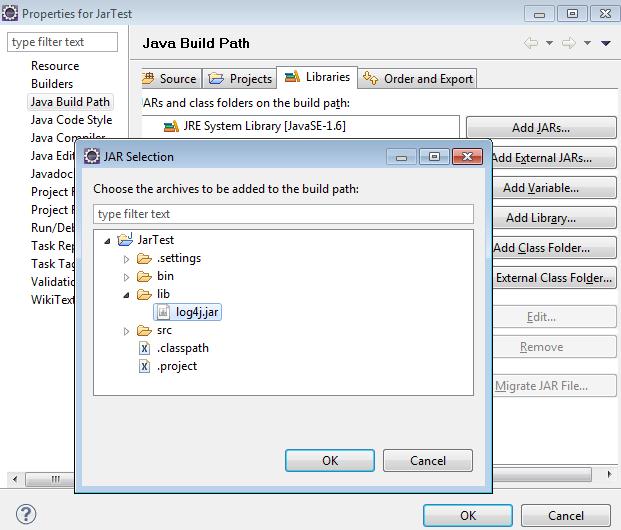
4. To configure log4j, create a file called log4j.properties and add the below code. Add this log4j property file in the src folder.
log4j.rootLogger=DEBUG, file
log4j.appender.file=org.apache.log4j.FileAppender
log4j.appender.file.File=C:/log/test.log
log4j.appender.file.layout=org.apache.log4j.PatternLayout
log4j.appender.file.layout.ConversionPattern=%d{ISO8601} %5p - %m%n
5. To package this project as a jar file.
a. Right Click on the project -> Export -> Java -> Runnable Jar File ->
b. Select the launch configuration.
c. Enter name of the jar file in the Export destination
d. Select “Package required libraries into generated Jar”
e. Click finish.
f. Now this application is packaged as a jar file.

6. If you extract the jar file, it will be like this.

7. To run a jar file, use below command.
java –jar jartest.jar
Tuesday, June 21, 2011
How to read property file in java?
public class ReadProps {
    public static void main (String[] args) {
        ReadProps readProps = new ReadProps();
        readProps.readFile("test.properties");
    }

    private void readFile (String fileName) {
        try {
            InputStream is = getClass().getResourceAsStream(fileName);
            Properties props = new Properties();
            props.load(is);
        } catch (IOException ex) {
           ex.printStackTrace();
        }
    }
}
Sunday, June 5, 2011
Parse a html file using HTMLParser
HTMLParser API is one of the powerful parser. Download the HTML Parser from the site below
| Autocad Designer | RAMTESA | United Arab Emirates | 31-May-2011 |
| OIL AND GAS DOWNSTREAM SALES ENGINE | RAMTESA | United Arab Emirates | 31-May-2011 |
Here is the java class which parses above html.
public class HtmlParserMain {
    public static void main (String[] args) throws Exception{
        FileInputStream fis =
                new FileInputStream (new File("C:/Akila/test.html"));
        //Create parser
        Parser parser = new Parser(new Lexer(new Page(fis, "UTF-8")));

        //Get specific node: Here I want only the tr nodes
        NodeFilter filter =
                    new AndFilter(
                        new TagNameFilter("tr"),
                        new HasAttributeFilter("class"));

        //Parse the html
        NodeList list = parser.parse(filter);

        //Get the iterator
        SimpleNodeIterator iterator = list.elements();

        //Iterate Table rows
        while (iterator.hasMoreNodes()) {
            //Get the TR node
            TagNode node = (TagNode)iterator.nextNode();
            NodeList tdList = new NodeList ();
            //Get the TD nodes
            node.collectInto(tdList, new TagNameFilter("td"));

            System.out.print(tdList.elementAt(0).toPlainTextString() + " : ");
            System.out.print(tdList.elementAt(1).toPlainTextString() + " : ");
            System.out.print(tdList.elementAt(2).toPlainTextString() + " : ");
            System.out.println(tdList.elementAt(3).toPlainTextString());
        }

        //If you want to parse the html directly from the web
        //Parser parse = new Parser ("http://www.google.com");
    }
}
Wednesday, June 1, 2011
Run an application which is packaged as a jar file
Step 1: Write a simple java class.
Step 2: Create a Manifest.txt file and add the main class which has "public static void main" method. The text file should be end with the new line otherwise the jar utility will not parse it properly. You will get this error - "Failed to load Main-Class manifest attribute from".
Main-Class: fully qualified name of the class
Ex: Main-Class: com.jar.HelloWorld
Step 3: Package this class as a jar file.
> jar cfm HelloWorld.jar Manifest.txt com*.*
c means "create an archive file"
f means "Specify the archive file name"
m means "include the manifest information from specified manifest file"
Step 4: Run the jar file as below
> java –jar HelloWorld.jar
The out of the program
>Hello World
package com.jar;
public class HelloWorld {
    public static void main (String[] args) {
        System.out.println ("Hello World");
    }
}
Step 2: Create a Manifest.txt file and add the main class which has "public static void main" method. The text file should be end with the new line otherwise the jar utility will not parse it properly. You will get this error - "Failed to load Main-Class manifest attribute from".
Main-Class: fully qualified name of the class
Ex: Main-Class: com.jar.HelloWorld
Step 3: Package this class as a jar file.
> jar cfm HelloWorld.jar Manifest.txt com*.*
c means "create an archive file"
f means "Specify the archive file name"
m means "include the manifest information from specified manifest file"
Step 4: Run the jar file as below
> java –jar HelloWorld.jar
The out of the program
>Hello World
Subscribe to:
Posts (Atom)